Integrating AI text generation capabilities into your applications can transform user experiences and automate content creation workflows. This comprehensive guide walks you through the process of implementing AI APIs in your projects.
Getting Started with AI APIs
Before diving into implementation, it's important to understand the landscape of available AI text generation APIs and choose the right one for your needs.
Popular AI Text Generation APIs
- OpenAI GPT API - Versatile and powerful for various text generation tasks
- Anthropic Claude API - Excellent for conversational AI and analysis
- Google PaLM API - Strong performance in reasoning and code generation
- Cohere API - Specialized in enterprise text generation solutions
Setting Up Your Development Environment
To get started with AI API integration, you'll need to set up your development environment with the necessary tools and dependencies.
Prerequisites
- Node.js (v14 or higher) or Python (v3.7 or higher)
- API key from your chosen AI service provider
- Basic understanding of HTTP requests and JSON
- Text editor or IDE of your choice
Basic API Integration Example
Let's start with a simple example using JavaScript to make API calls to an AI text generation service:
// Basic AI API integration example
const API_KEY = 'your-api-key-here';
const API_URL = 'https://api.example-ai-service.com/v1/generate';

async function generateText(prompt, options = {}) {
    try {
        const response = await fetch(API_URL, {
            method: 'POST',
            headers: {
                'Content-Type': 'application/json',
                'Authorization': `Bearer ${API_KEY}`
            },
            body: JSON.stringify({
                prompt: prompt,
                max_tokens: options.maxTokens || 150,
                temperature: options.temperature || 0.7,
                ...options
            })
        });

        if (!response.ok) {
            throw new Error(`API request failed: ${response.status}`);
        }

        const data = await response.json();
        return data.choices[0].text;
    } catch (error) {
        console.error('Error generating text:', error);
        throw error;
    }
}
Handling API Responses and Errors
Proper error handling is crucial when working with AI APIs. Network issues, rate limits, and API errors can occur, so your application should handle these gracefully.
Error Handling Best Practices
- Implement retry logic for transient failures
- Handle rate limiting with exponential backoff
- Provide meaningful error messages to users
- Log errors for debugging and monitoring
Optimizing API Usage
To get the best results and manage costs effectively, consider these optimization strategies:
Performance Optimization
- Caching - Store frequently requested results to reduce API calls
- Batching - Combine multiple requests when possible
- Streaming - Use streaming responses for real-time applications
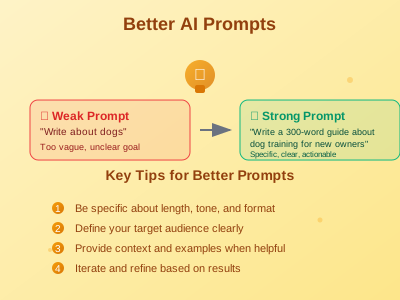
- Prompt Engineering - Craft efficient prompts to get better results
Security Considerations
When integrating AI APIs, security should be a top priority:
API Key Management
- Never expose API keys in client-side code
- Use environment variables for API key storage
- Implement API key rotation policies
- Monitor API usage for unusual activity
Data Protection
- Sanitize user inputs before sending to APIs
- Implement rate limiting on your endpoints
- Use HTTPS for all API communications
- Consider data residency requirements
Building a Complete Integration
Here's a more comprehensive example that includes error handling, caching, and user interface integration:
class AITextGenerator {
    constructor(apiKey, options = {}) {
        this.apiKey = apiKey;
        this.baseURL = options.baseURL || 'https://api.example.com/v1';
        this.cache = new Map();
        this.rateLimiter = new RateLimiter(options.rateLimit || 60);
    }

    async generate(prompt, options = {}) {
        // Check cache first
        const cacheKey = this.getCacheKey(prompt, options);
        if (this.cache.has(cacheKey)) {
            return this.cache.get(cacheKey);
        }

        // Rate limiting
        await this.rateLimiter.wait();

        try {
            const result = await this.makeAPICall(prompt, options);

            // Cache the result
            this.cache.set(cacheKey, result);

            return result;
        } catch (error) {
            this.handleError(error);
            throw error;
        }
    }

    async makeAPICall(prompt, options) {
        const response = await fetch(`${this.baseURL}/generate`, {
            method: 'POST',
            headers: {
                'Content-Type': 'application/json',
                'Authorization': `Bearer ${this.apiKey}`
            },
            body: JSON.stringify({
                prompt,
                ...options
            })
        });

        if (!response.ok) {
            throw new APIError(response.status, await response.text());
        }

        return await response.json();
    }
}
Testing Your Integration
Thorough testing is essential for reliable AI API integrations:
Testing Strategies
- Unit Tests - Test individual functions and error handling
- Integration Tests - Test the complete API workflow
- Load Testing - Verify performance under high load
- Mock Testing - Use mock responses for development
Monitoring and Analytics
Once your integration is live, monitoring is crucial for maintaining performance and managing costs:
- Track API usage and costs
- Monitor response times and error rates
- Set up alerts for unusual activity
- Analyze user interaction patterns
Conclusion
Integrating AI text generation APIs into your applications opens up exciting possibilities for enhancing user experiences and automating content workflows. By following best practices for security, performance, and error handling, you can build robust integrations that provide real value to your users.
Remember to stay updated with API changes, monitor your usage, and continuously optimize your implementation based on user feedback and performance metrics.